What's New with Shamel Studio?
Stay up to date with the latest improvements and additions to Shamel Studio. We're constantly working to make your production workflow better.
October 2026
👥 Introducing the Team Plan!
We've introduced a new Team Plan, designed for small production teams and companies that need to collaborate on projects.
The Team Plan includes everything in our Individual Plan, plus:
- • Activity Log: Track project activity and changes.
- • Team Comments: Leave comments and collaborate with your team.
- • Access Controls: Assign Viewer, Editor, or Owner permissions.
- • Remove Shamel Studio branding from your reports.
📅 Scheduling Updates
🌐 Offline Mode Is Here!
SchedulingOne of our most requested features! You can now download your projects and work on your schedules without an internet connection. When you're back online, your changes automatically sync.
• How to: On any project card, click the three dots (⋮) in the top-right corner → Make Available Offline.
⚙️ More Scheduling Customization
Scheduling• Additional Custom Categories: Three more custom element categories, bringing the total to seven for greater flexibility in your breakdowns.
• Sort by Script Day: You can now include Script Day as an additional sorting criterion, alongside other criteria, to customize how your Stripboard is organized.
💰 Budgeting Updates
📍 Oregon Support
BudgetingWe've expanded our automated budgeting support to include Oregon, making it easier to build budgets for productions filming in the state.
🎬 Shamel Studio in the Community
DGA: Ready, Set, Schedule!
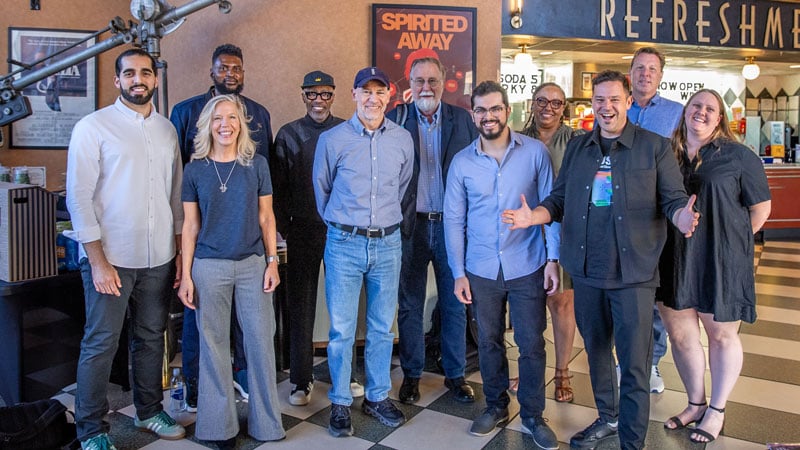
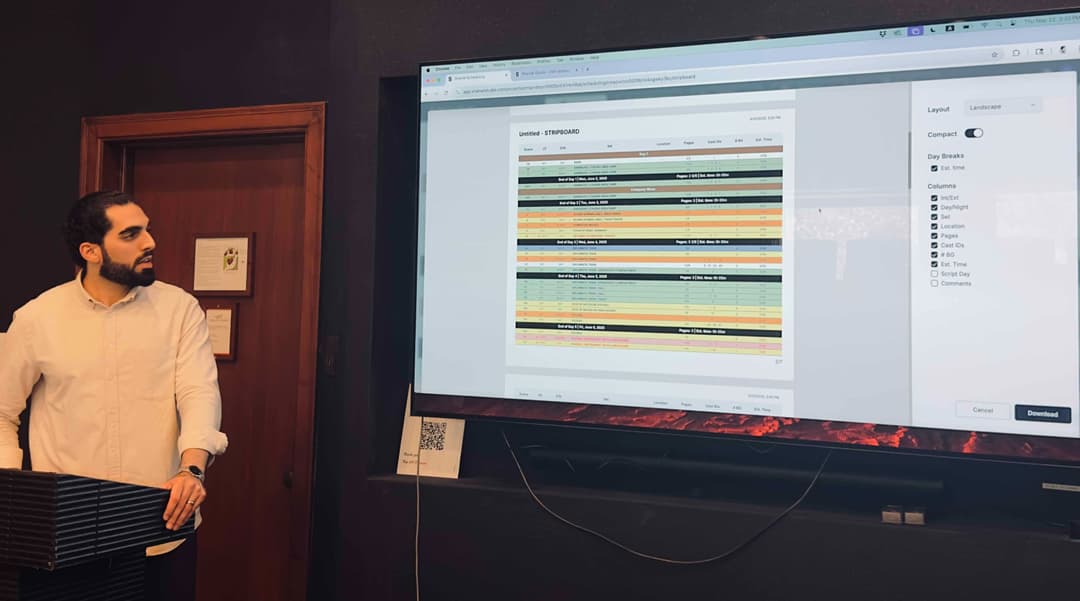
CommunityWe were invited by the DGA's 1st AD Committee to present Shamel Studio at Ready, Set, Schedule!, alongside other scheduling platforms. It was great meeting several of our users in person and showcasing our tools to more 1st ADs. Read the DGA Article.

A big thank you to the DGA and the AD Committee for the opportunity!
Film Independent Forum, WPS & PBS SoCal
CommunityWe were proud to sponsor this year's Film Independent Forum, where we demonstrated Shamel Studio to filmmakers and connected with industry professionals.
We also had the opportunity to present Shamel Studio to members of the Women's Production Society (WPS), a group of experienced production professionals from across the film and television industry.
At PBS SoCal's Fine Cut Mentoring Workshop, we introduced Shamel Studio to emerging filmmakers, demonstrated how the platform can support their projects, and answered their questions.
September 2026
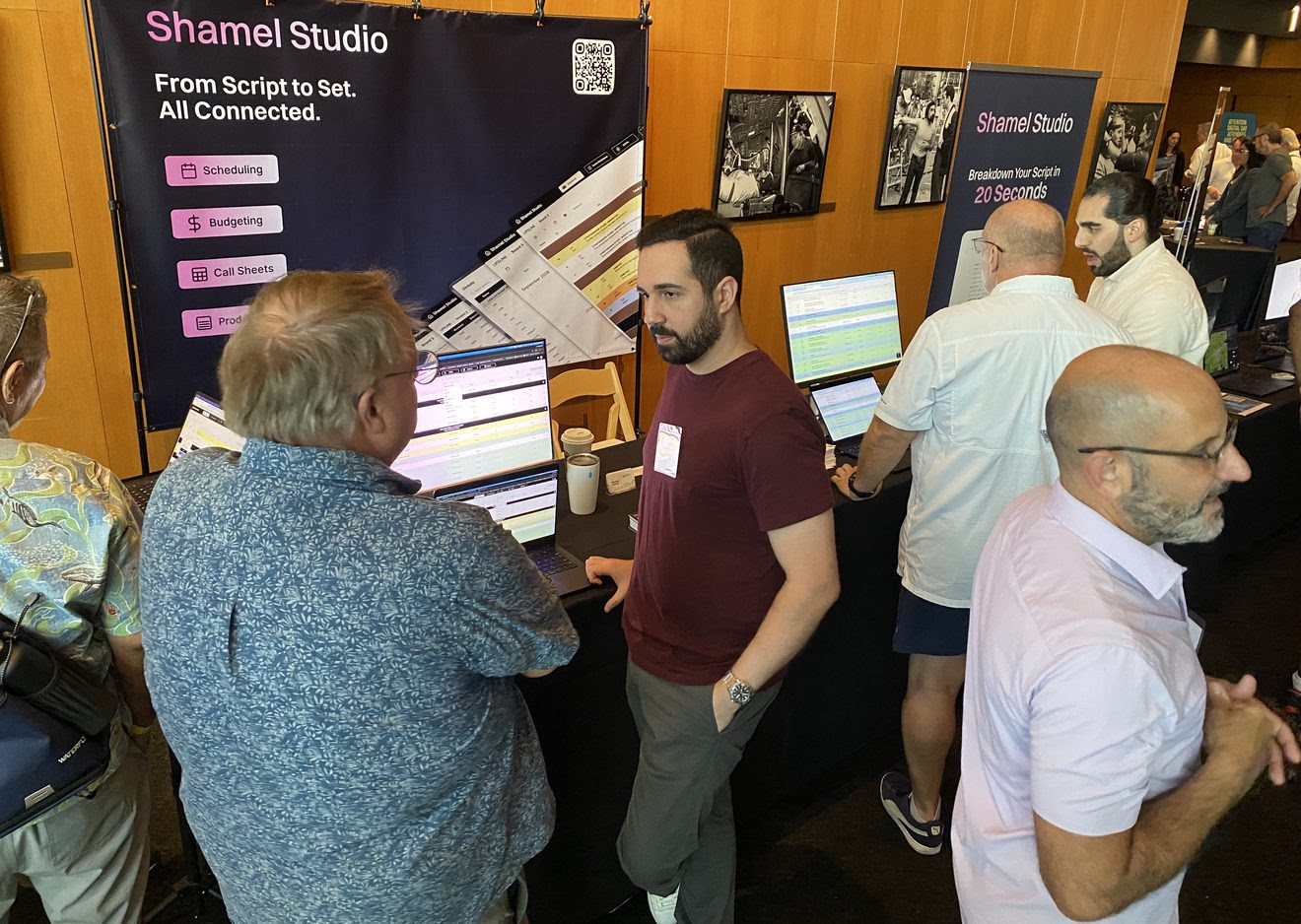
🎬 Thank You, DGA Digital Day!
Thank you to everyone who stopped by our booth at DGA Digital Day! It was great meeting so many Shamel Studio users in person, hearing how you're using the platform, and connecting with more members of the DGA community.
💰 Budgeting Updates
🔀 Compare Budget Versions
BudgetingCreate different versions of your budget and compare them side by side. Explore different scenarios, locations, assumptions, and more, then quickly see how each version impacts your budget.
📄 Continuous View
BudgetingReview your budget in a new Continuous View, with all accounts expanded into one seamless, report-style view directly within Shamel Studio.
• How to: On the Top Sheet → View → Continuous View.
📅 Scheduling Updates
⚙️ Scheduling Defaults
SchedulingCustomize how you like to work in Shamel Studio and save those preferences as your Scheduling Defaults. Your preferred Stripboard and Scene Breakdown settings will automatically carry over when you create new projects.
• How to: Click your Profile (top right) → Project Settings → Scheduling Defaults.
📜 Even Better Script Processing
SchedulingWe've made our script processing even better, with improvements across the breakdown process to deliver more accurate and consistent results when starting a new schedule.
✨ More Scheduling Improvements
SchedulingYou can now export specific shooting days for both Stripboard and Shooting Schedule reports. Export only the days you need instead of the entire schedule.
• How to: Reports → Select Stripboard or Shooting Schedule → Filter → Select your shooting day range.
We've also added more ways to sort your projects, including by date created, date updated, and alphabetical order.
August 2026
✨ August Updates
This month brings new budgeting flexibility with Secondary Locations and Suppress Tags, a redesigned Elements Table, and more control over your Call Sheet scene and crew times.
💰 Budgeting Updates
📍 Secondary Locations
BudgetingFilming in two states? No problem. You can now add a Secondary Location, and Shamel will automatically populate the applicable fringes and tax incentives for the additional state.
• How to use it: Budget Assumptions → Secondary Location.
🏷️ Suppress Tags
BudgetingYou can now suppress specific tags to better fit your production needs and explore different budgeting scenarios.
🎬 New DGA Rates
BudgetingThe new 2026–2027 DGA agreement rates are now updated and available in Shamel Studio.
🎓 New In-Depth Budgeting Tutorial
BudgetingOur new in-depth Budgeting Tutorial is here! Follow the complete budgeting workflow from start to finish, including our latest tools and features. Watch the Budgeting Tutorial.
📅 Scheduling Updates
📺 Customize Episodic DOODs
SchedulingChoose exactly which episodes appear in your Day Out of Days report, whether you want to view a single episode, multiple episodes, or the entire show.
👁️ Hide Script in Scene Breakdown
SchedulingYou can now hide the script while working in Scene Breakdown, giving you more space to focus on your breakdown and elements.
🗂️ Elements Table Redesign
SchedulingWe've redesigned the Elements Table for a cleaner experience and improved performance, especially when working with larger schedules.
📄 Call Sheet Updates
⏱️ More Control Over Scene & Crew Times
Call SheetsScene tables now support both Time and Duration, so you can display the time of day for each scene, its estimated duration, or whichever works best for your production. We've also expanded crew call time options from 15-minute to 5-minute increments.
July 2026
📄 Call Sheets Got Smarter
This month brings major upgrades to Call Sheets, from automatic schedule syncing to full customization and templates, plus a handful of scheduling improvements.
📄 Call Sheet Updates
🔄 Automatic Schedule Sync
Call SheetsYour Call Sheets stay in sync with your schedule as changes happen, keeping your production documents accurate without manual updates.
• How to use it: Call Sheet (top menu) → Select the day → Sync from Schedule.
🎨 Full Call Sheet Customization
Call SheetsCustomize your Call Sheets exactly how you need them. Show or hide sections, reorder them, format text, resize sections, and more.
📋 Call Sheet Templates
Call SheetsCreate your own Call Sheet templates and apply them across projects for a faster, more consistent workflow.
• How to use it: Call Sheet (top menu) → Select the day → Save as Template.
⏰ Crew Time Formulas
Call SheetsAutomate crew call times for every department. When the General Crew Call changes, all dependent call times update automatically.
• How to use it: Call Sheet (page 2) → General Crew Call (top left) → Formulas.
📥 Import Crew Lists
Call SheetsImport your crew from a CSV file or enter crew members directly within Shamel Studio.
• How to use it: Cast & Crew (top menu) → Crew tab → Upload CSV.
🎓 New Call Sheets Tutorial
Call SheetsWatch our complete Call Sheets tutorial to learn everything from setup to customization. Watch it here.
📅 Scheduling Updates
🏷️ Auto Banners
SchedulingApply banners across your entire schedule with a single click. For example, automatically insert a 30-minute lunch break into every production day of a 50-day schedule in seconds.
📊 Report Customization
SchedulingCustomize your reports with additional options including titles, scaling, colors, and more.
✨ More Scheduling Improvements
SchedulingWe've also added bulk DOOD downloads, improved project sharing controls, and the ability to split or merge INT/EXT and DAY/NIGHT on the stripboard.
June 2026
🎉 Our Biggest Budgeting Update Yet
We've redesigned Shamel Budgeting from the ground up to give you a faster, smarter, and more flexible budgeting experience.
⚙️ Advanced Configuration
BudgetingVisualize your crew, add or remove crew members before creating your budget, and see the budget update live as you make changes.
🔄 Dynamic Union Tier Changes
BudgetingYou can now change your union tier at any time, even after your budget has been created. Perfect for comparing different budget scenarios or staying within union thresholds.
🚚 Teamsters 399 Automation
BudgetingTeamsters rates are now fully automated for both the Basic and Low Budget Features Agreement, including positions such as Location Managers and Drivers.
🎬 Complete Low Budget Support
BudgetingWhether you're budgeting a $300K, $700K, or $1.5M feature, Shamel now automates crew, equipment, locations, fringes, and more for low-budget productions.
👥 Crew Blocks
BudgetingCrew members are now organized into Crew Blocks, giving you more flexibility and precision while building and managing your budget.
✨ And More
BudgetingWe've also added live crew counts, improved performance throughout the budgeting workflow, and many other refinements to make budgeting faster and more responsive.
May 2026
🗺️ Tax Incentive Map
Free ToolExplore our new interactive Tax Incentive Map, a free tool covering every US film incentive program in one place. Browse tax credits, rebates, caps, minimum spend requirements, and payroll fringe rates across all 50 states, DC, and Puerto Rico.
📍 DGA Seminar in Atlanta
CommunityLast month, we were invited to speak on a panel hosted by the Directors Guild of America (DGA) in Atlanta, Georgia. The conversation focused on innovative technology in production, where we shared Shamel Studio's vision and how we're thinking about AI in real production workflows. One of the best parts of the trip was meeting many of our users in person. Nothing beats hearing directly from the people using Shamel Studio on their productions. Read more.
📺 Episodic DOODs
SchedulingFor multi-script schedules, you can now view your Day Out of Days by episode or display multiple episodes at once, making episodic scheduling easier to manage.
🎓 New In-Depth Scheduling Tutorial
SchedulingWe've released a new step-by-step scheduling tutorial covering the full workflow from start to finish, including many of Shamel's advanced features. We'll continue updating it as new features are released. Watch it here.
📋 Filter Elements in Shooting Schedule Reports
SchedulingYou can now export Shooting Schedule reports with specific element categories only, giving you cleaner and more focused reports based on your needs.
↕️ Script Order vs Stripboard Order
SchedulingUnder Scene Breakdown, you can now choose whether scenes display in Script Order or Stripboard Order.
🔗 Share Links
SchedulingInvite collaborators directly by email and control who has access to view your schedule. You can also generate a view-only share link to send to anyone.
• How to use it: Check it out under the Reports tab.
April 2026
📊 Film Waterfall Calculator
Free ToolTry our new Film Waterfall Calculator, a free tool available to everyone. Model different financial scenarios, evaluate projects, and prepare clear projections to present to potential investors. Want to brush up on how the waterfall works? Read our film recoupment waterfall guide.
📄 Generate Sides from Your Schedule
SchedulingYou can now generate Sides in seconds, directly from your schedule.
🎬 2nd Unit Support
SchedulingShamel Scheduling now supports 2nd Unit scheduling. Assign scenes to 2nd Unit and easily filter them in reports when needed.
📋 Element List Report (PDF & Excel)
SchedulingDownload a complete list of elements by category, available in PDF or Excel, and sort them using different criteria for easier tracking.
⚙️ More Scheduling Customization
SchedulingAdditional customization options now available, including strip colors for INT/EXT, custom columns, and sorting options for non-Cast DOOD (shooting order, script order, alphabetical).
⚙️ More Call Sheet Customization
Call SheetsWe've added more flexibility to Call Sheets, including a Phone column in the crew table and improved interactive weather updates.
March 2026
📝 Script Revision
SchedulingWorking with a new draft just got easier. Upload a revised script and Shamel detects the changes between versions, updating only the scenes that changed so you don't have to redo your breakdown. New scenes are added, removed scenes are cleared, and your existing work stays intact.
📊 Reports Tab Redesign
SchedulingThe Reports tab has been redesigned with previews and expanded options. You can now generate and export all reports from one place with better visibility and control.
🗂 Element Management Enhancements
SchedulingWe've added more control over elements: Lock Cast IDs to prevent accidental changes, and sort categories by First Occurrence to match script order.
📍 Nebraska Added
BudgetingBudgeting now supports Nebraska, including fringes and tax incentive information.
🌎 Custom Locations (Other)
BudgetingFilming somewhere not on our list? You can now select "Other" and customize fringes and incentives based on your production needs.
✂️ Cut & Paste in Topsheet & Accounts
BudgetingYou can now cut and paste rows in the Topsheet and Accounts, making budget adjustments faster.
February 2026
✨ Smart Suggestions for Cleaner Breakdowns
SchedulingTry our new Suggestions feature to quickly identify and merge similar Cast and Set entries. Shamel now suggests elements that may be duplicates or closely related, helping you keep your reports clean, organized, and accurate.
📥 Scriptation Import
New IntegrationWe're excited to announce our integration with Scriptation. You can now import your script directly into Shamel Studio while preserving your tags and notes, making the transition seamless. See how it works here.
🔄 Move Elements Across Categories
SchedulingYou can now move an element from one type or category to another with a single click. Easily reassign items without deleting and recreating them.
🏷️ Tags in Budget Reports
BudgetingYou can now filter exported budget reports by tags. This is especially useful when preparing reports for film commissions or managing productions across multiple states or countries.
📍 Florida, Washington & Massachusetts Added
BudgetingWe've expanded budgeting support to include Florida, Washington, and Massachusetts, complete with local incentives and relevant rates.
🖱️ Right-Click Apply in Budget Details
BudgetingYou can now right-click in Budget Details to apply fringes or tags instantly, speeding up your workflow.
January 2026
📋 Shamel Production Reports Launched!
New PlatformWe’ve launched Production Reports, a major new release designed to work seamlessly with Call Sheets. Information now flows smoothly from Call Sheets into Production Reports, reducing manual entry, improving accuracy, and making it easier to track what actually happened on the day. From cast and background counts to schedule details, Production Reports help close the loop between planning and execution, all in one place.
🔢 Bulk Scene Renumbering
SchedulingYou can now auto-renumber scenes with a single click as you make changes, keeping everything in sync without manual cleanup.
🧳 Travel & Hold Days on DOOD
SchedulingYou can now mark Travel Days and Hold Days directly on your Day Out of Days for better planning and clarity.
0️⃣ Day Zero on DOOD
SchedulingSupport for Day Zero is now available on the DOOD, making pre-shoot planning easier to track.
✂️ Cut & Paste Strips
SchedulingYou can now cut and paste strips directly on the Stripboard for faster schedule adjustments.
📍 Hawaii Added
BudgetingWe now support Hawaii in budgeting, including fringes and tax incentives.
📤 Nevada Export
BudgetingYou can now export the needed documents for Nevada's Tax Credit Program, from your budget with a click.
👥 Pre-Filled Crew Positions
Call sheetsCrew tables now come with pre-filled positions, saving setup time.
↕️ Reorder Departments
Call sheetsYou can now reorder departments in the crew table to match your preferred layout.
December 2025
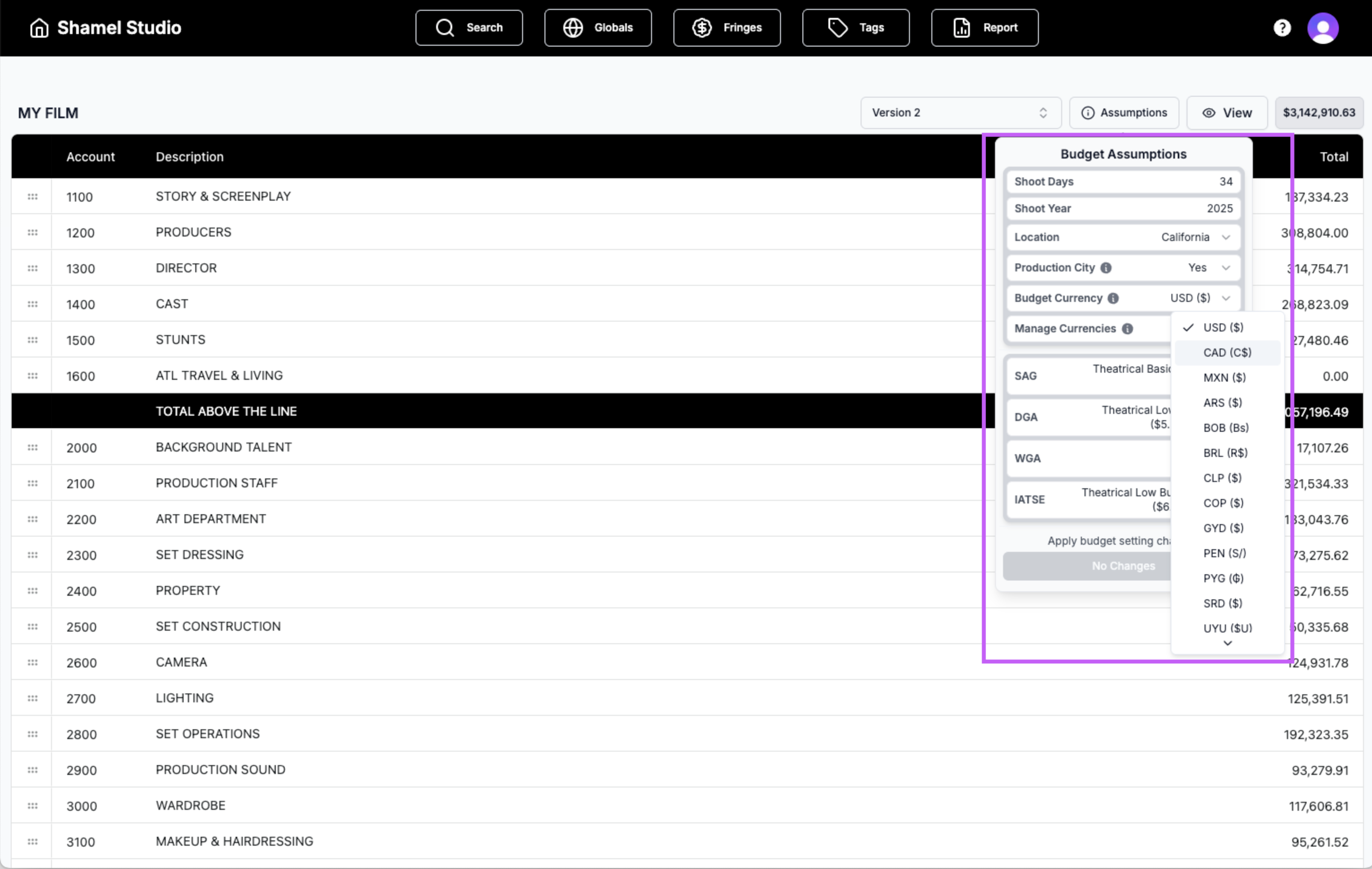
💰 Multiple Currencies
BudgetingYou can now budget using multiple currencies, giving you more flexibility for international productions.
• How to use it: In your Budget Assumptions, go to Budget Currency and Manage Currencies to change or add currencies.
📍 Montana + Puerto Rico Added
BudgetingWe've added Montana and Puerto Rico to our supported locations, complete with tax incentives, fringes, and labor information.
📊 Excel Export
BudgetingYou can now export your budgets to Excel for easier sharing and further analysis.
• How to use it: Go to the Reports tab and select Excel Report.
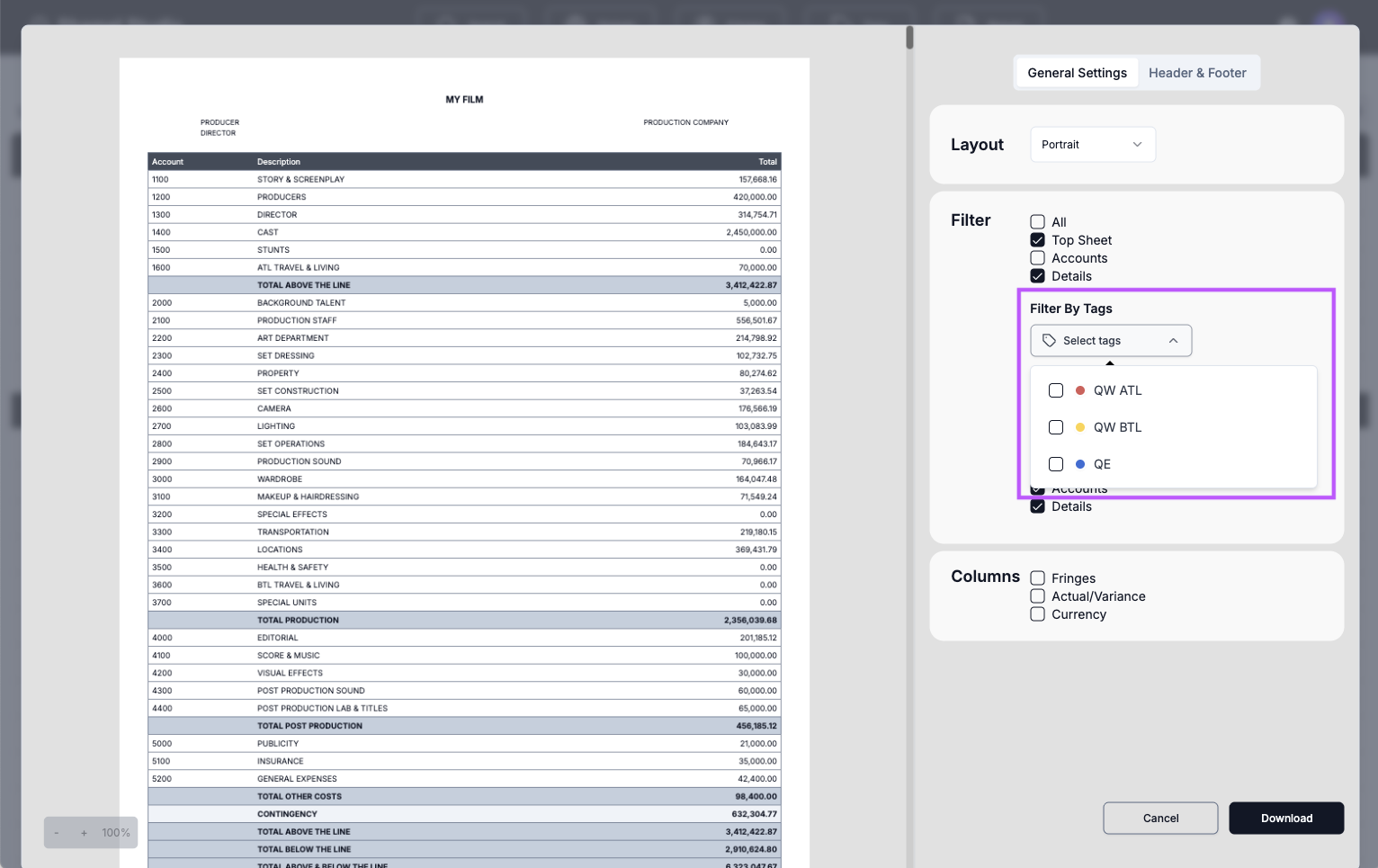
🏷️ Tag Colors + Tag Report Filters
BudgetingTags now support custom colors, and you can filter your reports using tags for quicker, clearer budgeting insights.
• How to use it: In the PDF Report Preview, open Filter By Tags and choose the tags you want to include.
🎭 Background Actor Counting
SchedulingYou can now view background actor counts per scene, giving you more control over how your BG is tracked and displayed.
November 2025
🔗 Advanced Element Linking
SchedulingYou can now link elements beginning from any point in the script, including Locations. This helps you track changes that start mid-story. For example, if a character gets a scar halfway through the script or starts wearing a specific wardrobe piece later on, you can link that element from that scene onward and keep everything accurate.
🔍 Search Your Script
SchedulingYou can now search for any word or phrase inside your script and jump to it instantly.
Find it under: Scene Breakdown
📍 Multi-Apply for Location & Script Day
SchedulingYou can now apply a Location or Script Day to multiple scenes at once.
How to use it: On your Stripboard, select the strips you want, right-click, and choose Edit Location or Edit Script Day.
💬 New Chat Support
SupportWe've added a chat feature to our website for faster, easier support. Reach out anytime if you have questions or need help with your schedules or budgets.
October 2025
📋 Reorder Stripboard Columns
SchedulingYou can now reorder columns on your stripboard to match your preferred layout and workflow.
🌐 Public Schedule Sharing
SchedulingYou can now share your schedule publicly, let your team view your Stripboard, Calendar, or DOOD without requiring a Shamel Studio account or sign-up. Check it out under the Reports tab.
🚩 Red Flags for Availability
SchedulingIntroducing Red Flags, you can now mark cast or other elements as unavailable to help avoid scheduling them on conflicting days.
📰 Shamel Studio Blog Launch
LaunchWe've officially launched the Shamel Blog, featuring articles on film production tools, scheduling tips, and behind-the-scenes insights from the Shamel team.
September 2025
💰 Full Budgeting Automation
BudgetingBudgets are now fully automated, including Labor and Equipment costs. Even tags for Above and Below the Line are automated, saving you time and cutting down on manual edits.
📆 Drag & Drop Days on DOOD
SchedulingRearranging your schedule is easier than ever. Simply drag and drop days directly in your Day Out of Days.
🗓️ Drag & Drop Days on Calendar
SchedulingThe same smooth drag and drop functionality is now available in the Calendar View for flexible, visual scheduling.
🎨 Element Color Picker
SchedulingYou can now choose custom colors for your elements, giving you greater control and clarity in your breakdowns.
How to use it: Go to Scene Breakdown → Click the color circle next to the category name
August 2025
📂 MovieMagic Budgets Import
BudgetingImport your MovieMagic Budgeting XML files directly into Shamel to make switching or collaborating easier than ever.
📑 Multiple Script Upload
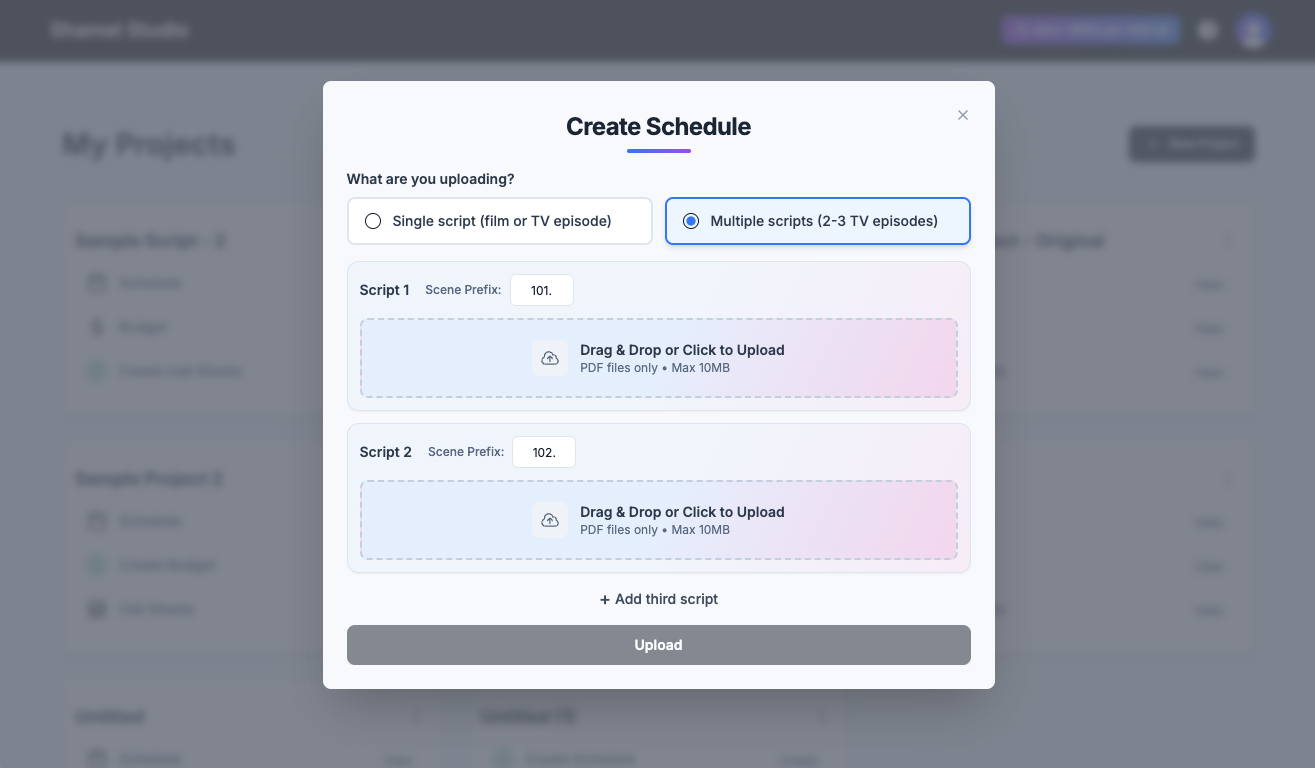
Perfect for TV episodes, block shooting, and multi-part projects. Upload 2–3 scripts at once and assign a prefix to scene numbers for each script.
💰 New State Coverage: Tennessee (TN) and Texas (TX)
BudgetingWe’ve added Tennessee (TN) and Texas (TX) to our list of supported locations, complete with tax incentives, fringes, and labor rates.
📝 Budget Notes in Details
You can now add and view notes directly in your budget details for clearer communication and organization.
🖱 Right-Click Menu on Stripboard
SchedulingScheduling just got faster. Right-click on your stripboard to quickly access key actions without breaking your flow.
July 2025
📋 Multiple Boards per Project
You can now create up to three different stripboards within a single schedule, perfect for experimenting with versions, shooting plans, or day-out-of-days variations.
🗓️ New Calendar View
View and drag scenes directly on a calendar for a more intuitive scheduling experience.
Where to find it: Go to the Stripboard menu → Calendar View.
🏷️ Custom Categories for Elements
SchedulingScene Breakdown now supports four fully editable categories, giving you more flexibility to match your team's workflow.
🌍 Expanded French Language Support
SchedulingWe've expanded our language tools. Shamel Studio now offers enhanced support for French scripts across breakdowns, summaries, and detection.
June 2025
⚙️ Auto Sort Your Stripboard
Now you can sort your strips with one click using a 5-level hierarchy, built with insights from conversations with experienced DGA Assistant Directors.
📋 Element Occurrences
Quickly access a complete list of all element occurrences across your schedule, making breakdown management faster and more transparent.
🎨 Custom Strip Colors
SchedulingYou can now customize stripboard colors to fit your preferences or production workflow.
How to use it: Go to View → Strip Colors.
📄 Elements Copy/Paste Between Scenes
SchedulingSelect multiple elements across categories and paste them into any scene, great for speeding up repetitive breakdown work.
How to use it: Select elements using Cmd/Ctrl, then press Cmd/Ctrl + C, go to the desired scene, and press Cmd/Ctrl + V.
📆 Flexible Off Days
SchedulingSet weekly off days or fully customize them based on your specific production schedule.
📍 Now Supporting CT and OH
BudgetingBy user request, we've added Connecticut and Ohio to our list of supported states, now with up-to-date tax incentives, fringes, and labor rates.
May 2025
Scene Split Tool
You can now split scenes directly inside Shamel Studio—the perfect solution for montages written under one scene heading or a large scene that needs to be shot over multiple days.
Now Supporting MMS 10 Export
SchedulingIn addition to MMS6, you can now export your schedule to MMS10—and the same file works on both versions! Need help? Check out our guide.
Spanish Language Support
SchedulingWe've expanded our support for Spanish scripts, now offering full functionality across scene breakdowns, synopses, and auto-detection—perfect for international productions.
🎓 Workshop at AFI
We were honored to lead a Scheduling & Budgeting workshop for students and staff on campus at the American Film Institute, helping them get the most out of Shamel Studio. Interested in a workshop for your team or school? Let us know.
April 2025
Improved Budget Copy/Paste
BudgetingYou can now copy and paste entire rows and accounts in your budget for faster, more efficient editing.
Background Actor Count Display
SchedulingNow it's easier than ever to display and adjust background actor counts by group directly on the Stripboard and Scene Breakdown.
🎓 Workshop with Universidad San Francisco de Quito
EventsWe were thrilled to host a Scheduling & Budgeting workshop for students and staff at Universidad San Francisco de Quito, to help them get the most out of Shamel Studio. Interested in a workshop for your team or school? Let us know.
March 2025
Expanded Unions Support
SchedulingNow automating rates for unions' higher-budget productions, including IATSE Tier 3, with coverage for both production and non-production cities
Instant Budget Search
BudgetingNeed to find something fast? Our new Budgeting Search Tool lets you search your entire budget in seconds
Smarter Globals & Fringes
SchedulingNew tools to filter, organize, and structure your Globals and Fringes easily
Revamped Projects Page
LaunchA fresh, interactive design for a smoother, more intuitive project management experience
Referral Program
ReferralShare and Earn: Share your unique promo code with friends and colleagues and earn up to $113 per referral!
Go to your profile icon and select Referral Program to start earning
February 2025
Expanded State Coverage in Budgeting
Budgeting11 States Now Supported: Complete fringe and tax credit information now available for California, New York, New Jersey, New Mexico, Georgia, Louisiana, Alabama, Kentucky, Illinois, Mississippi, and Oklahoma
Project Sharing
CollaborationCollaboration Feature: Share your projects with other Shamel users (available for paid plan subscribers)
Enhanced Stripboard Banner Options
SchedulingNew menu options for banner management including banner duplication capability
January 2025
Shamel Call Sheets Launch!
Call sheetsCreate call sheets automatically from your schedule with two clicks
Events & Features
EventsDGA Digital Day Success: Use code DGA50 by September 15th for 50% off
American Film Convention: Join us on October 17, 2024
Create schedules from scratch without script upload
Budgeting Improvements
BudgetingCreate and manage multiple budget versions for different scenarios
Location-specific budgets for CA, NY, and NJ with regional fringes and tax incentives
Single-click fringe range selection
Automatic account number adjustment with sub-account renumbering
December 2024
Scene Breakdown Enhancements
SchedulingElement Linking: Link elements like Cast and Sets to Props, Set Dec, HMU, etc., directly
Apply All Scene Tagging: Tag an element and apply it across all scenes in one click
Edit Element Names: Double-click any element to rename it instantly
Stripboard Updates
SchedulingEdit scene numbers directly in the stripboard with double-click
Automatic day breaks based on estimated scene times
Send strips to top or bottom with a single click
Element Management & Shortcuts
SchedulingSmart suggestions for names and IDs when merging elements
One-click element ID reorganization
New keyboard shortcuts - access via Help menu or CMD + K
November 2024
Advanced Scheduling Features
SchedulingPre-shoot days planning with enhanced team communication
Banners with embedded estimated time for key moments
Budgeting Improvements
BudgetingCreate and manage multiple budget versions for different scenarios
Location-specific budgets for CA, NY, and NJ with regional fringes and tax incentives
Single-click fringe range selection
Automatic account number adjustment with sub-account renumbering
October 2024
Major Platform Updates
LaunchShamel Budgeting Launch: Create accurate budgets with auto-filled rates and fringes
Scene Breakdown Redesign: Enhanced navigation and streamlined workflow
September 2024
Events & Features
EventsDGA Digital Day Success: Use code DGA50 by September 15th for 50% off
American Film Convention: Join us on October 17, 2024
Create schedules from scratch without script upload
Stripboard Improvements
SchedulingUndo/Redo functionality for stripboard actions
Multi-row scene deletion capability
August 2024
Stripboard Customization
SchedulingNew Compact View for better scene and day overview
Customizable columns with new View Tool
Optional Estimated Time display on day breaks
Dynamic Print Preview for customized exports
June 2024
Movie Magic Scheduling (MMS) Integration
SchedulingExport to Movie Magic Scheduling including scene order, summaries, and auto element detection
May 2024
New Features & Plans
LaunchFree Plan Launch: Experience Shamel without time constraints
Link Scene Feature: Connect sheets with corresponding script portions
Hold Days: Apply directly from Day Out of Days report
April 2024
Platform Launch
LaunchInitial launch of Shamel Scheduling